How to switch to an Instagram professional account, and why DM automation needs one
Instagram only lets connected tools read comments and send DMs for professional accounts: Creator or Business. Switching takes about a minute in the Instagram app, it is free, and you can switch back. This guide shows the four steps and what changes on your account.
Steps checked against the Instagram app on 17 November 2026.
Why does Instagram DM automation need a professional account?
It is a rule of Instagram’s official API, not of any particular tool. Every service that uses that API has the same requirement.
The official API only serves professional accounts
Meta’s documentation says that to use the Instagram APIs an account must be a professional account, which can represent a business or a creator. Personal accounts cannot be connected.
Creator and Business both work
Instagram describes Business accounts as made for retailers, local businesses, brands and service providers, and Creator accounts for public figures, content producers, artists and influencers. For comment-to-DM automation there is no difference.
You do not need Meta Verified or a Facebook Page
The switch is a free setting. CommentKeyword connects through Instagram’s own sign-in, which does not require a Facebook Page linked to the account.
It is the most common reason a connection stops
If you try to connect a personal account, Instagram asks you to switch first. Cancelling that screen ends the connection. Switch in the app, then connect again.
How to switch to an Instagram professional account in four steps
Instagram changes its menus often, and the labels also vary with the app version and the language. We cannot guarantee that this route matches your app exactly: if a label is different, look for the closest option.
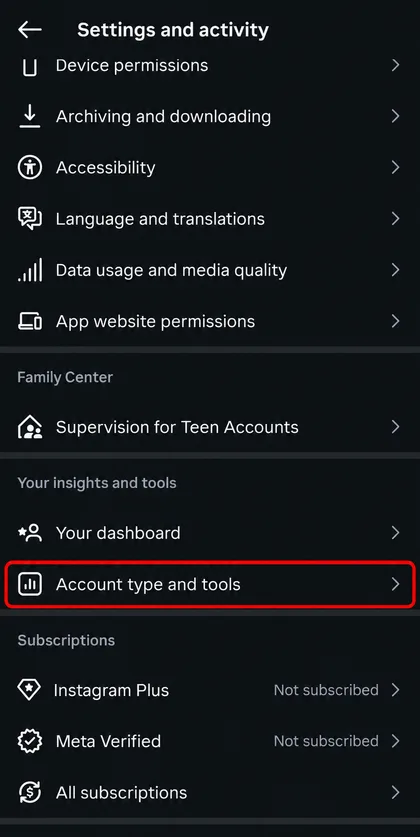
Open Account type and tools
In Instagram, open your profile, tap the menu (≡) and go to Settings and activity. Scroll to the section for professionals and tap “Account type and tools”.
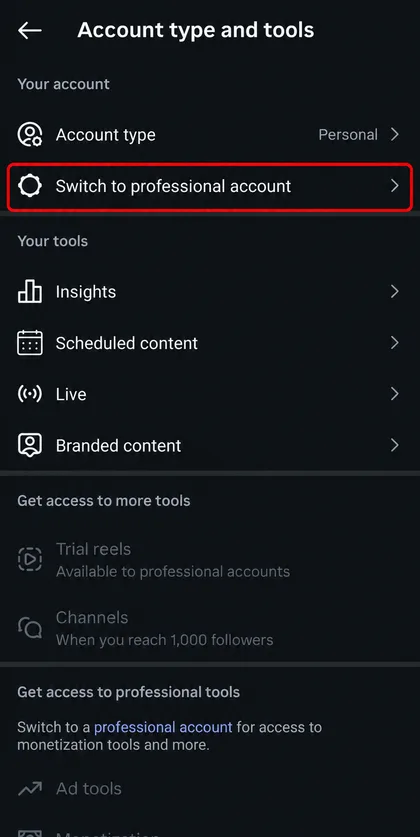
Start the switch
Tap “Switch to professional account”. Do not choose Instagram Plus or Meta Verified: neither is needed.
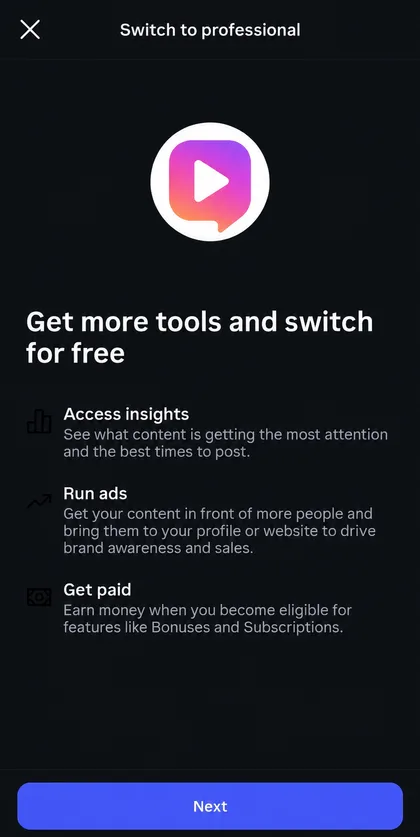
Continue for free
Instagram’s screen confirms that the switch is free. Tap “Next” and go through the short introduction.
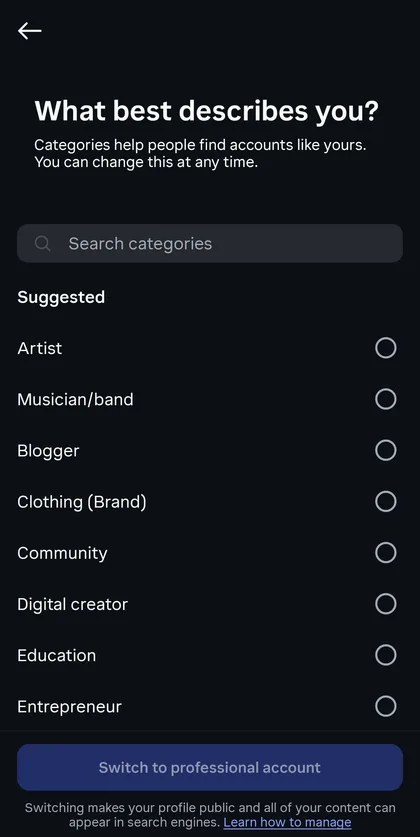
Choose your category and account type
Pick the category that describes you best. If Instagram asks, choose Creator or Business. The contact details and the Facebook Page it offers afterwards are optional and can be skipped.
Connect the account
Back in CommentKeyword, open Settings → Instagram, select Connect Instagram Account and approve the permissions requested.
What you need to connect Instagram to CommentKeyword
Only the account itself. There is nothing to install and no password to share with us.
Try CommentKeyword freeWhat you get
An Instagram professional account: Creator or Business
Signing in through Instagram and approving all the requested permissions
No Facebook Page, no Meta Verified and no minimum number of followers
One Instagram account per workspace
What changes when you switch, and what does not
The switch changes the type of account, not the account itself.
A private account becomes public
Instagram states that switching a private personal account to a professional account makes it public, and that pending follow requests are accepted automatically. Decide before you switch.
Your profile stays the same
The username, the posts and the followers are not touched by the switch. You gain insights and the tools for professionals.
You can switch back
In Account type and tools, open Account type, tap “Switch account type” and choose personal. Instagram warns that you lose access to ads and some tools, and that your insights data is erased each time you go back to a personal account. Instagram moves this option from time to time, so the route may differ in your app.
Switching back disconnects automation
A personal account cannot stay connected to tools that use the API. Your keywords in CommentKeyword are kept, but they stop running until a professional account is connected again.
Instagram professional account FAQs
Short answers to the questions buyers usually ask before testing this workflow.
Is switching to a professional account free?
Yes. Instagram shows a screen during the switch confirming that it is free. Meta Verified and Instagram Plus are separate paid products and are not needed.
Should I choose Creator or Business?
Choose the one that describes you. Both are professional accounts and both work with comment-to-DM automation. You can change between them later in the same menu.
Will my followers notice the switch?
Instagram does not announce it. Your profile can show a category label under your name, which you can hide in the profile settings. If your account was private, it becomes public.
I switched, but the connection still fails. What should I check?
Make sure you signed in with the account you switched, and that you approved every permission on Instagram’s screen: missing permissions prevent replies and DMs. Then try Connect again from Settings → Instagram.
Can I keep my account private and still automate DMs?
No. Professional accounts are public, and the API only serves professional accounts.
Next steps after switching
Explore the next pieces of Instagram comment-to-DM automation, from safe setup to stronger campaign ideas.
Comment-to-DM Setup Tutorial
Step-by-step tutorial: connect Instagram, create a keyword, write the public reply and DM, then test it. Auto-DM everyone who comments your keyword.
Read the guide ->Compliance Guide
Is Instagram DM automation allowed? Learn the safe approach: official APIs, user-triggered comments, private replies, rate limiting, and no scraping.
Read the guide ->Limits and Rules
Instagram DM automation limits from Meta’s docs: 750 private replies per hour, 7 days to reply to a comment, one message per comment, 24-hour window.
Read the guide ->Switched? Connect the account and create your first keyword
Once the account is professional, connecting it to CommentKeyword takes one sign-in through Instagram. The Free plan includes 300 automated DMs per month.
Start free